About Aisol CMS Select
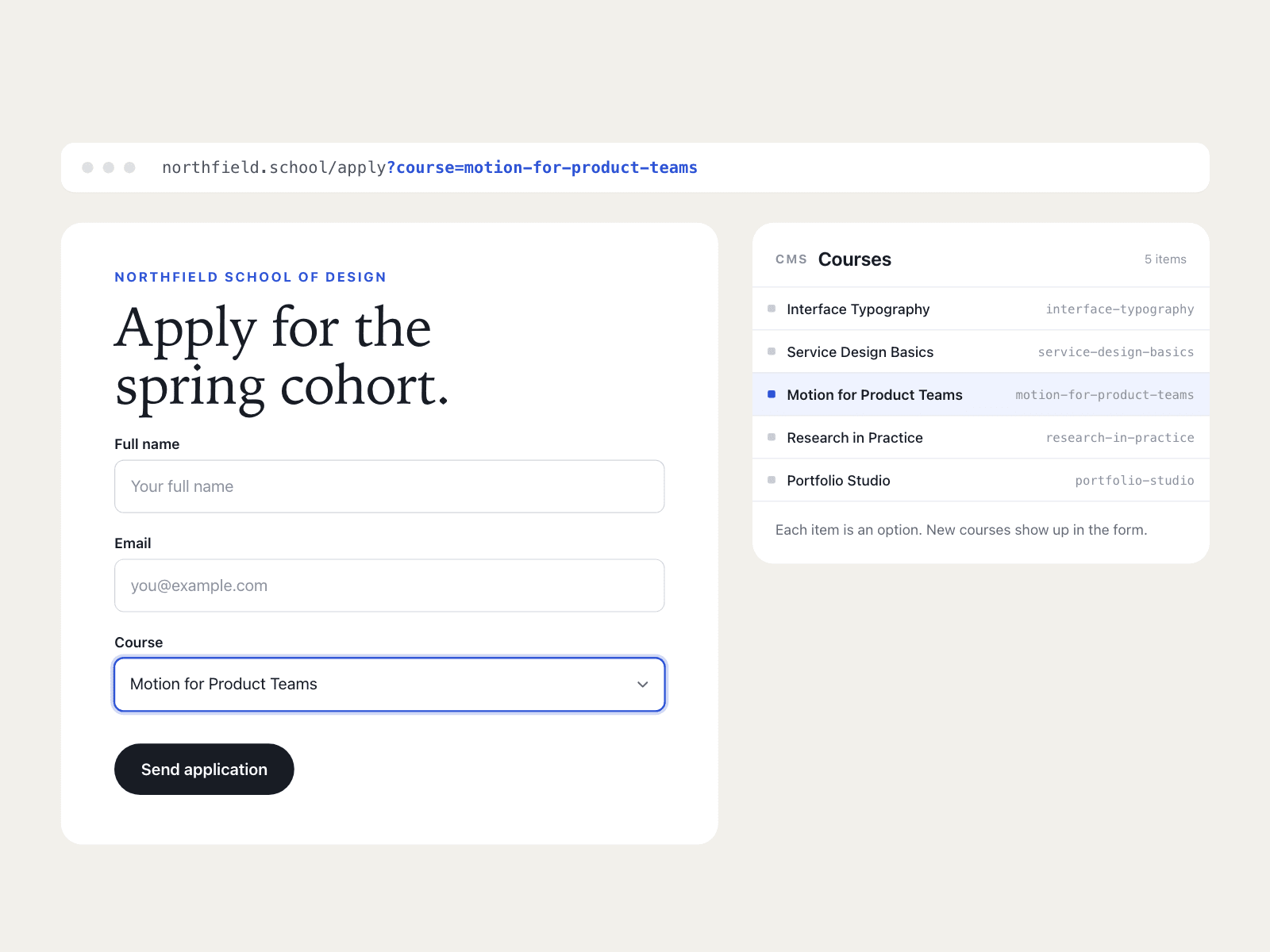
Aisol CMS Select is a native dropdown for Framer Forms whose options come from a Collection List, so new CMS items show up in the form without editing it.
It can open with an option already chosen, from a URL like /apply?course=design-systems or from a Default you bind to a CMS field on a detail page.
It only reads the list you drop in and never writes to it, and because it is a real select, keyboards, screen readers and phone pickers work as usual.
- Each CMS item gives one option from its Option layer; an optional Value layer (e.g. the slug) is what the form sends.
- Without a list, the Options you type in the panel are used, so it works the moment you drop it in.
- Matches by label, value or slug, and a visitor's own choice is never overwritten.
- It grew out of the Lyceum Academy template, where every course page opens the apply form with that course picked.
What you control
• Options from a Collection List, or typed in, plus extra options at the end
• Option and Value layer names
• Default option and URL parameter for preselect
• Field name, placeholder, screen reader label, required
• Font, text size, height, radius and five colours
Limits: turn off the Collection List's pagination so every item is read; the open option list is the browser's own and cannot be styled; options from the CMS appear on the live site, the canvas shows the typed Options.